
What every content creator should check before publishing
Follow a 6-step content quality checklist built to help solo creators and teams deliver polished, error-free work with confidence.
CONTENT DESIGN
Veilworx


We’ve all spent hours curating the perfect content, hitting publish, and then spotting a typo or, even worse, a broken link. And these kinds of mistakes tend to happen due to a lack of a thorough review process. A smart publisher knows that content quality control is the last line of defence. Mainstream advice tells you to "proofread everything" without explaining how, so you end up staring at your work for the 100th time. This guide breaks down content quality control into a simple publishing checklist that you can use as a team manager or solo creator.
Why content review matters
Content review is an intentional process differentiating between hoping everything is right and knowing it is. It helps you create brand trust with the audience, erase the potential of small mistakes occurring, and remain consistent across platforms. You can invest your time and creativity into a piece, but without a thorough content review, you are prone to mistakes and inconsistencies that hinder you from hitting your mark.
The 6-part content review checklist
Clarity and readability: Everyone needs to be able to read and understand your content, unless it’s tailored for a specific audience. A good way to start is by taking a clarity test. Save your content, take a break, come back and read it aloud. If you stumble over sentences or lose your main point, readers will too. Also, don't forget to break up long paragraphs. Anything over 4-5 lines on mobile feels overwhelming.
Brand voice and tone consistency: Read your last three published pieces back-to-back and check if the tone matches your audience's expectations. Your brand voice is what makes your content distinctly yours. If you don't have one, here is a guide on creating the right tone of voice for your brand.
Fact-check everything: This step is non-negotiable, but most times, rushed. You need to click every single link. If you mention company names, leadership, or industry examples, verify they're still accurate. These things can change faster than we think sometimes.
Technical basics: Grammar and spelling mistakes are very common. You must pay special attention to homophones that spell-check tools won't catch. Most importantly, focus on headlines and subject lines as they're the first thing people see, contact information, links, dates and times for events or deadlines.
Accessibility: Accessible content is better for everyone so use clear headings and maintain an easily scannable structure. Also make sure to use descriptive link text and add alt text to images; overall engagement improves. Lastly, take note of your colour contrast, if applicable.
SEO and discoverability: It’s essential to maintain SEO best practices like keyword inclusion in strategic spots, having comprehensible meta descriptions, and strategically adding links to external related pages.
But it’s also paramount to focus on writing for humans first and search engines second. The goal is discoverability, so aim for helpfulness rather than hitting keyword counts.
Who should review content and when
To ensure you prioritise quality content, you must know when to incorporate external review into your process. After your first draft, engage a second pair of eyes, preferably someone who wasn't involved in creating the content. For content creators working with stakeholders, stakeholder review should be strategic. Involve them when your content structure is solid but not locked down. Some sensitive content requires specialist review, such as legal compliance, technical accuracy, or brand approval, but a lot of content just need someone with fresh eyes and good judgment.
Tools to speed up your content review process
For writing quality, Grammarly handles obvious errors and Hemingway Editor helps with readability.
For workflow management, use tools like Notion or Trello to help create templates and checklists.
For SEO optimisation, Yoast for WordPress or tools like Clearscope can help you as you write.
Tools like WebAIM and Screaming Frog can help with accessibility and broken links.
Your phone is perfect for checking how the content looks on mobile, but the best free tool is reading aloud.
Don’t let perfection be the obstacle of progress. A quick review is better than no review at all. Great content takes a lot of work behind the scenes, but we’re here to help.
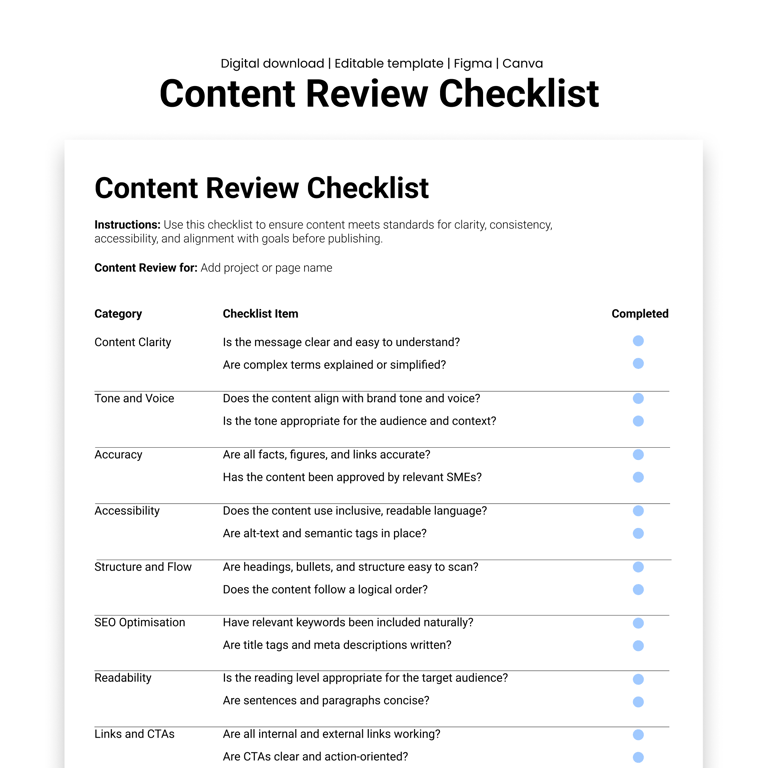
Use Veilworx's Content Review Checklist as a tool for your final review process to ensure content quality control every time you publish!
Design resources that deliver results
Copyright © Veilworx Ltd 2024. All rights reserved.
Registered in England and Wales.
Company number: 15318142

Contact
Email: contact@veilworx.com
Address:
Office 9944, 182-184 High Street North East Ham London
E6 2JA
Business hours:
Monday to Saturday: 10am to 6pm
Sun: Closed